PROS Revenue Management Platform
During my UX Design internship at PROS, I worked on product strategy and developed AI features for the Revenue Management (RM) platform for airline analysts of all experience levels.
ROLE
UX Design Intern
TIMELINE
Jun – Sep 2025
TEAM
UX Strategist, UX Researcher, PM
TOOLS/SKILLS
Figma, Claude, Figma Make
1.
Context

Revenue Management Platform @ PROS
PROS is a B2B software company that builds digital products for commercial airlines and their internal teams. I worked with the UX Strategist, User Researcher, and Project Manager to define the design direction for the Revenue Management Platform (RM) with dual focus to modernize the platform and explore AI integration.
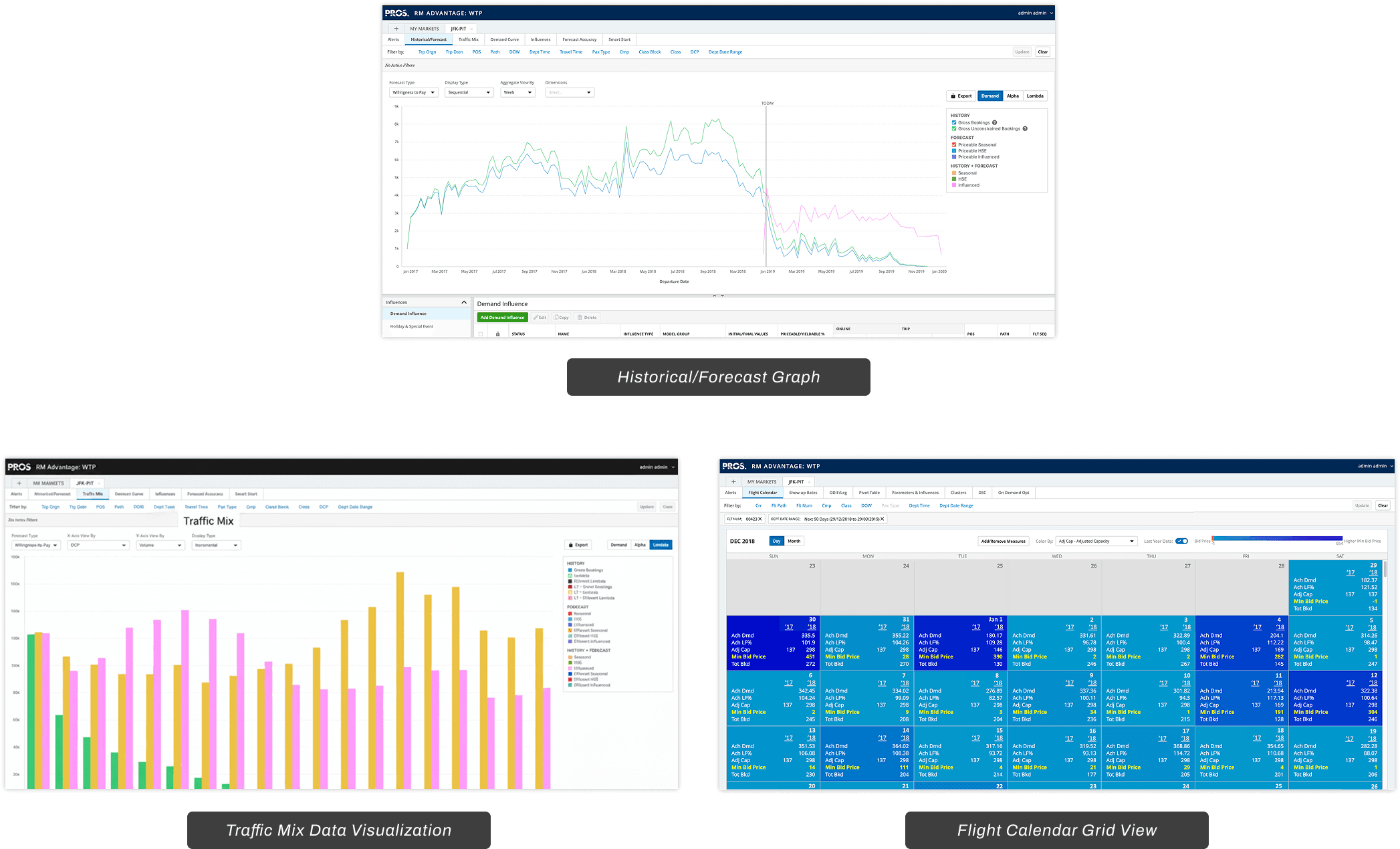
Precedent Revenue Management Screens for Market JFK-PIT
How Covid-19 affected the Airline Industry & RM
When COVID-19 hit, travel came to a halt. Airlines faced widespread layoffs, including airline analysts. With them went years of institutional knowledge.
When hiring picked back up, a new generation of analysts entered the field.
The RM platform has a steep learning curve. It assumed users would have expert guidance or in-depth tutorials.
However, the new generation of analysts prefers to learn differently as they've shown a preference for AI tools. Meanwhile, Senior analysts still make up a significant portion of the user base and have established workflows.
The challenge: How might we support Junior analysts without disrupting the workflows Senior analysts rely on?
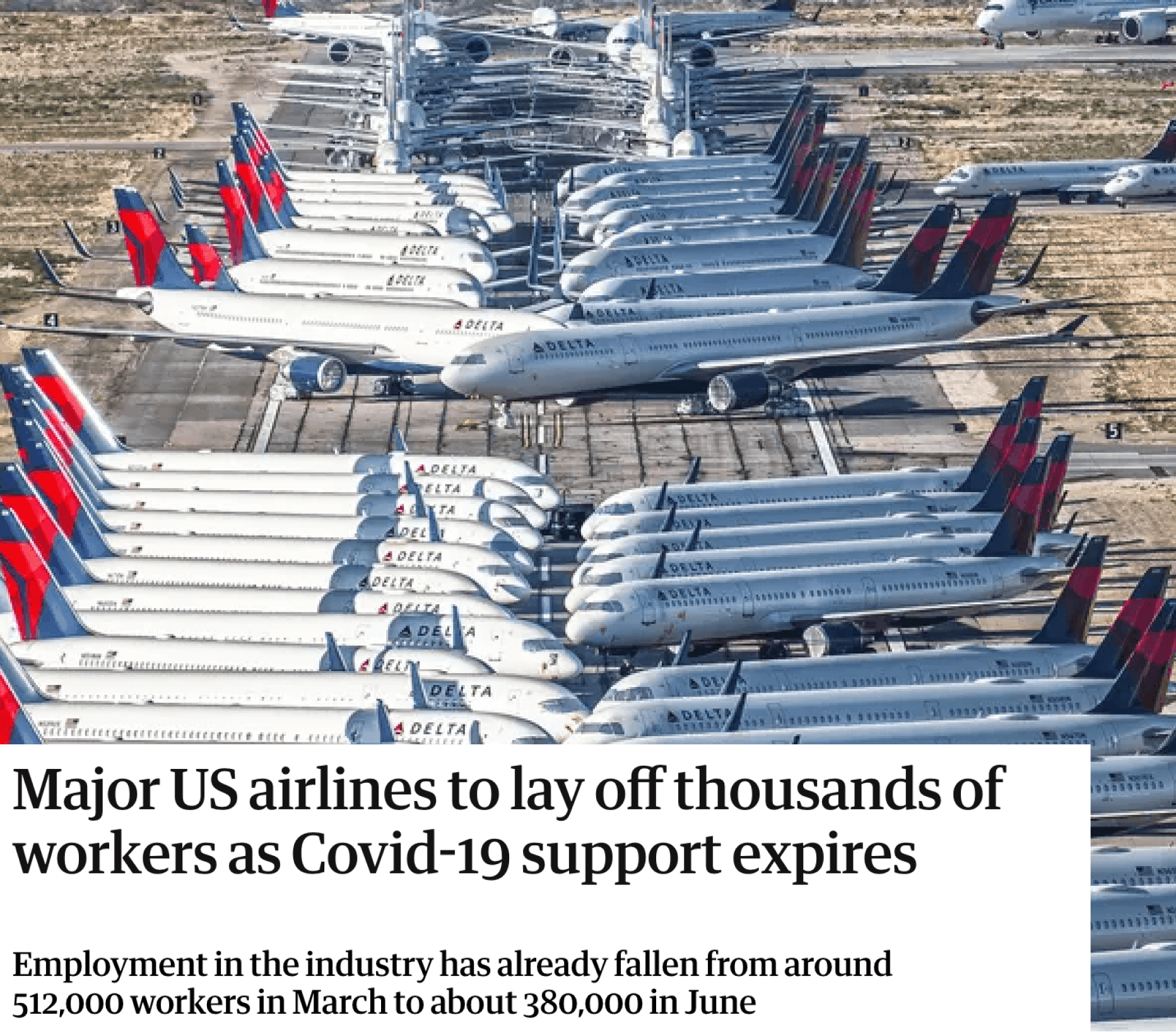
Airplanes parked at Southern California Logistics Airport in July 2020. (Credit: Ryan Patterson)
THE CHALLENGE
How might we modernize the RM platform and meaningfully integrate AI to support both Senior analysts and Junior analysts?
2.
Solution Preview
TL:DR
A smarter, faster, and more thoughtful Revenue Management platform.
Revenue management is how airlines price flights and manage seat inventory, now clearer, faster, and built with optional AI.
3.
Research
Pain Points in the Analyst Experience
I joined the RM team after user research was already conducted. To get up to speed, I met with the User Researcher and UX Strategist to review the findings. I also talked with the PM, who had been working directly with airline analysts and the Customer Support team.
From the research and these conversations, I walked away with three key pain points:
High Cognitive Load
Junior Analysts were dropped into complex views without context or clear priorities.
Low User Adoption
Junior Analysts abandoned tasks mid-way and opted for AI workarounds.
Training Dependency
Junior Analysts relied on Senior Analysts and AI for guidance when stuck.
Main Pain Points from User Research/Internal Interviews
Distinctive Users with Varying Levels of Expertise
Both the user research and internal interviews revealed that the main users of RM were now composed of Junior and Senior Analysts. I outlined these user personas to align the team and guide our design direction.
The personas made one thing clear: Junior Analysts needed help getting started and building confidence. Senior Analysts needed speed. Designing for one would frustrate the other so the solution had to find the balance between both.
Junior Analysts

Avery Chen
24 years old
Houston, Texas
1 year of experience
Needs:
To learn on the job without constantly relying on senior colleagues
A clear starting point every time she logs in
Thoughtful guidance that helps her build confidence over time
A new analyst learning the ropes and trying to work independently.
Senior Analysts

Alex Reyes
42 years old
Houston, Texas
10 years of experience
Needs:
To make price adjustments efficiently without unnecessary steps
Alerts that show him what needs attention and leave out what does not
External market data brought into the platform so he does not have to source it himself
An experienced analyst who needs efficiency without disruption.
Mapping out the Current State
I mapped out the relationship between users, the platform, and the three pain points.
High cognitive load pushed Junior Analysts in two directions. Some left the platform entirely. Others turned to workarounds, relying on Senior Analysts or AI to get by.
For Senior Analysts, that meant interruptions every time a Junior asked for help. Sometimes they had to stop their own work to guide or manage the Junior. The platform served neither user well.
The redesign had to do two things: reduce the friction that pushed Juniors away, and match the convenience of the workarounds they'd already discovered.
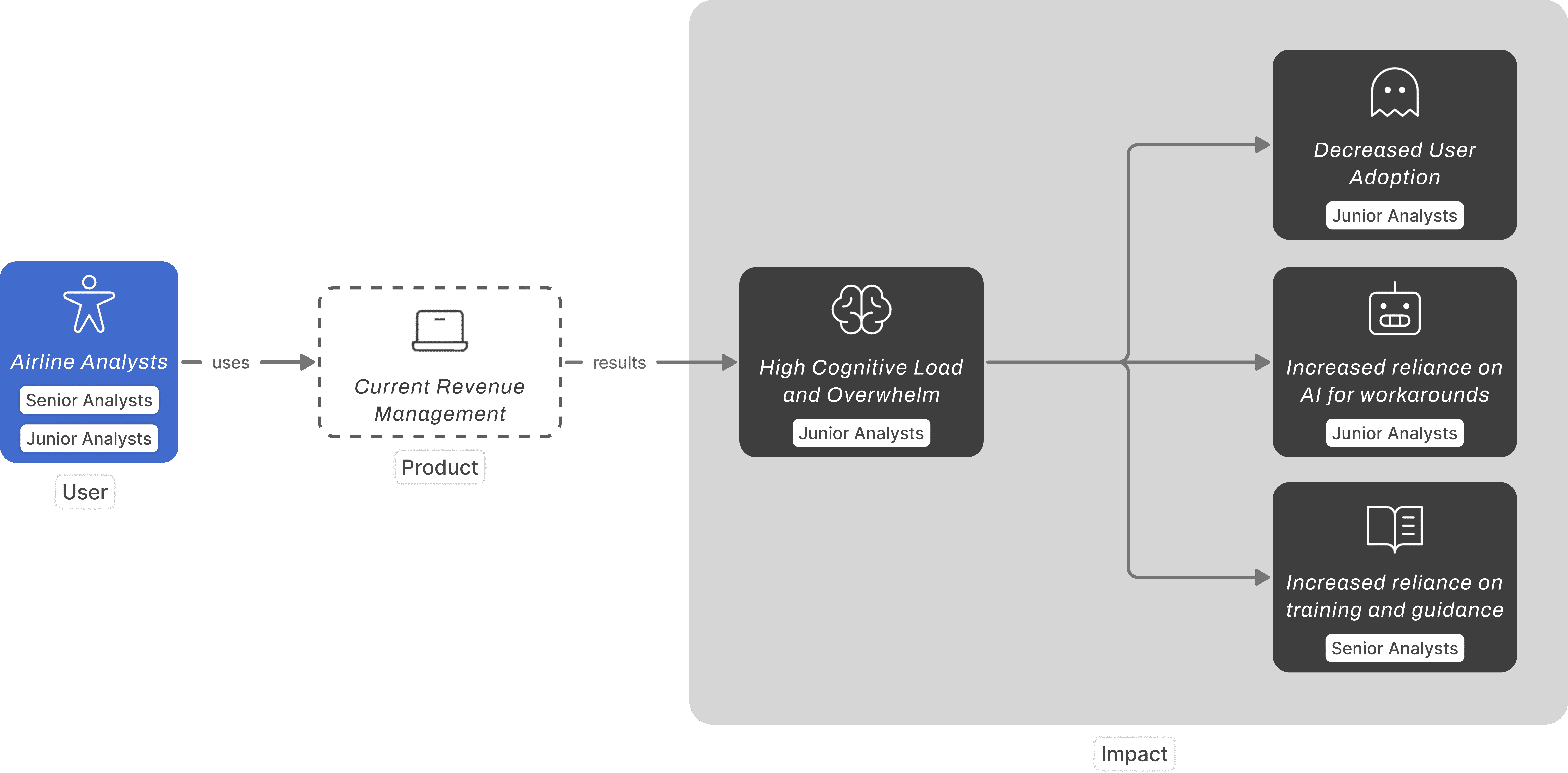
How the current RM experience affects Senior and Junior Analysts differently
Same Platform, Different Experiences
I wanted to see exactly where Junior and Senior experiences diverged. That would help me narrow in on where a redesign would have the most impact.
Even though they were using the same platform, their paths looked completely different. The divergence starts at login. Juniors land without direction. Seniors land with purpose.
Juniors couldn't initiate tasks while Seniors could, so we focused on that earliest divergence: the landing experience.
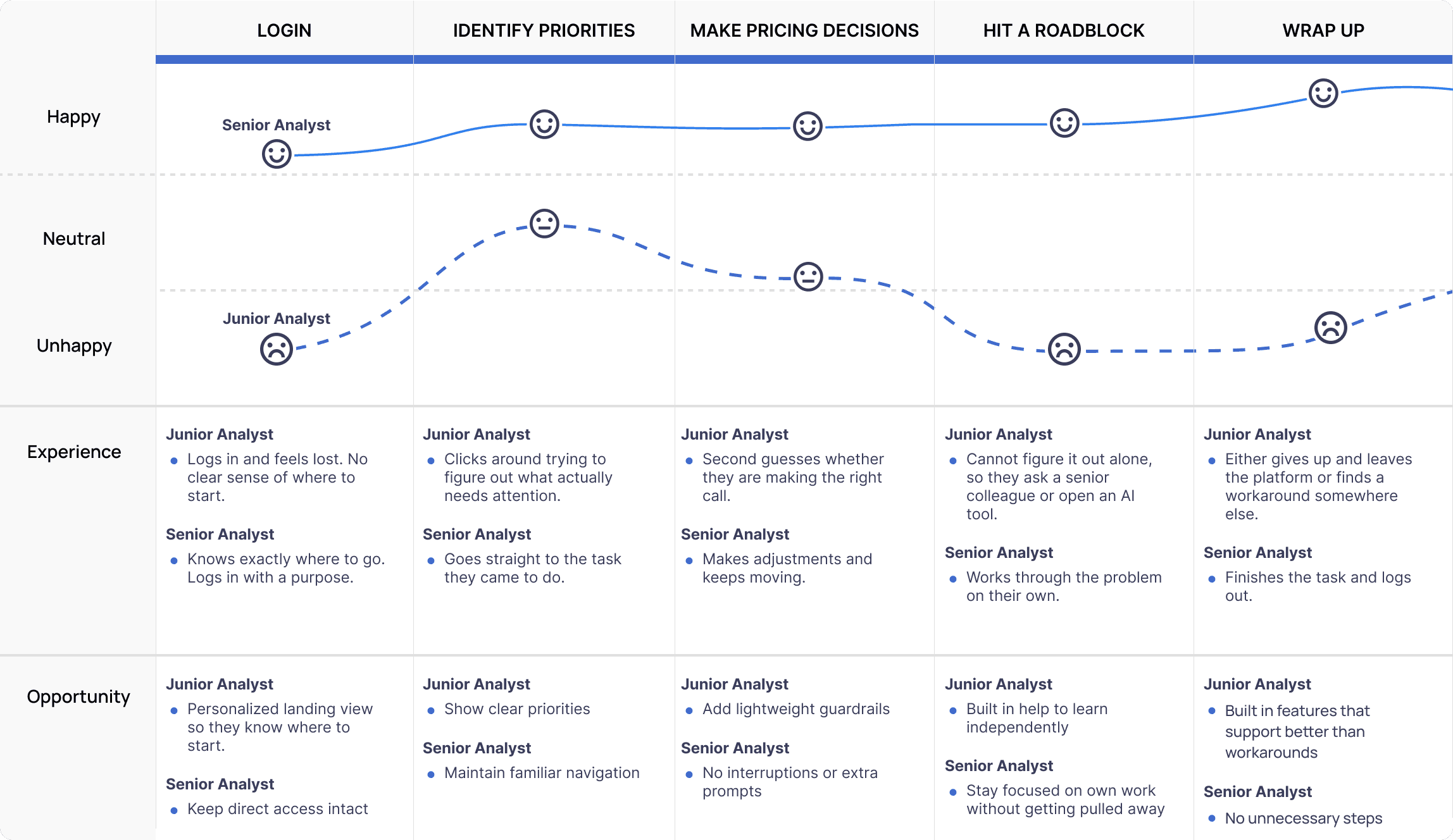
A comparative look at how Junior and Senior Analysts move through the same platform differently, highlighting where design opportunities exist.
THE CHALLENGE (REVISED)
How might we modernize the landing experience to help Junior analysts get started and Senior analysts work more efficiently?
4.
Development
Approved Concepts
After identifying the core pain points, we brainstormed concepts to address them. I suggested starting with My Markets, a core screen where research showed Juniors spent the most time getting lost. The team agreed and suggested adding Market Overview, which Senior analysts commonly use.
From there, we brainstormed two additional features: an AI assistant and an onboarding experience. We discussed who each feature was for and agreed that both had to serve Junior and Senior analysts.
A dashboard that shows analysts which markets need attention first.
I suggested this because research showed Juniors spend the most time here.
Analytics with booking outlooks and trend data. Context an analyst needs to understand their markets.
The team added this because Senior analysts use it regularly.
A welcome message and a quick tour. Just enough to orient new users and introduce what changed.
Seniors need a brief rundown. Juniors need more guidance. The onboarding had to work for both.
Context-aware guidance that suggests next steps based on what's on screen.
Juniors were already using external AI tools. I wanted to bring that help directly into the platform and support Senior analysts too.
WIREFRAME TESTS
AI Assistant: Exploring Placement
How might we offer AI help that's there when you need it and invisible when you don't?
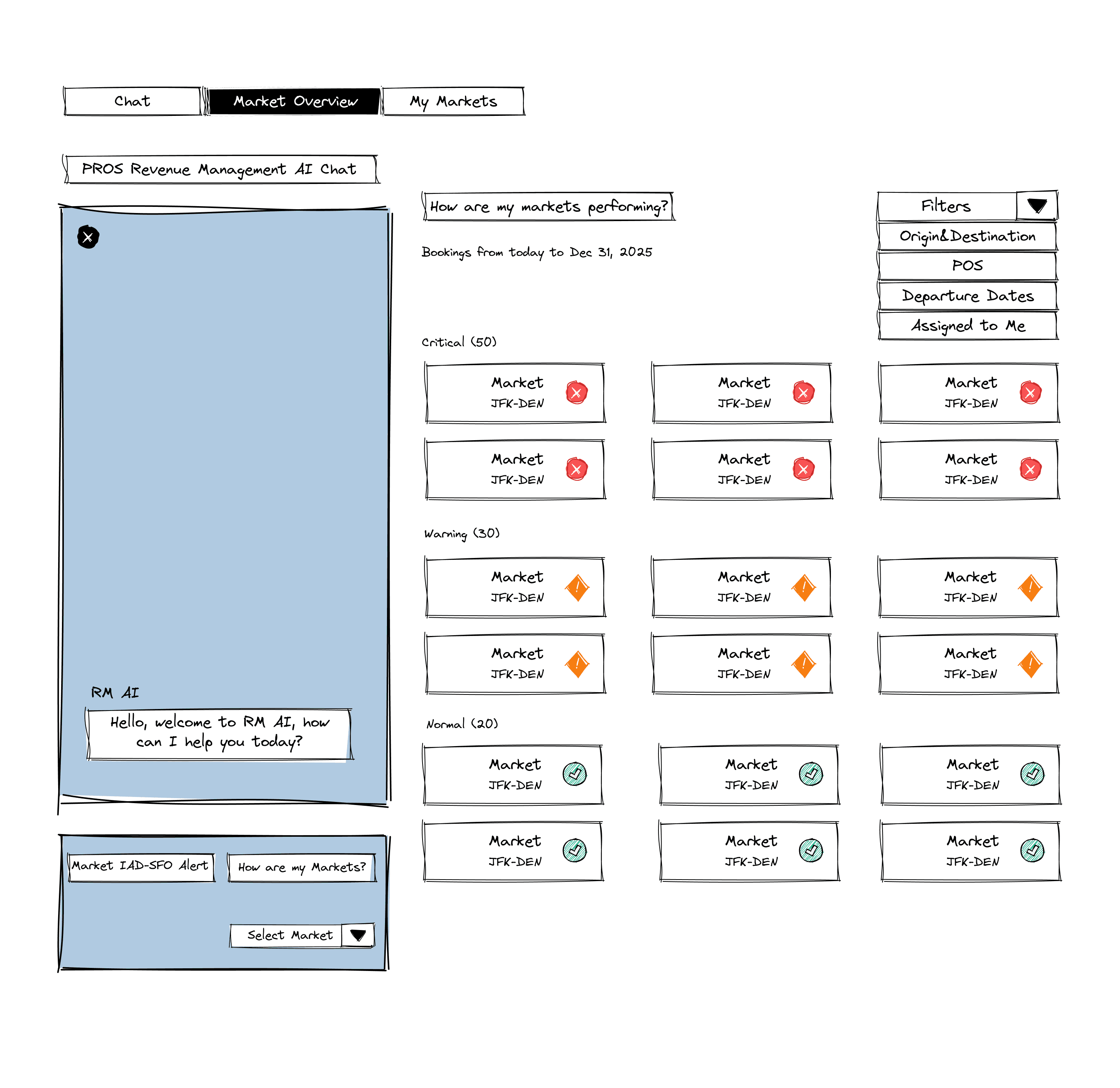
AI Assistant: Hybrid Approach
After bringing the options to design critique sessions with the entire UX design team. We decided to scrap the left panel entirely. It suggested the AI was leading the experience and removed user agency. But no single option felt right on its own
So we combined what worked from each. A right side panel for quick, optional help that keeps the user in control. Embedded AI suggestions for lightweight guidance. And a dedicated AI chat screen for deeper assistance
With this solution, Juniors get support to build confidence. Seniors get support to stay efficient.
Right Chat Panel
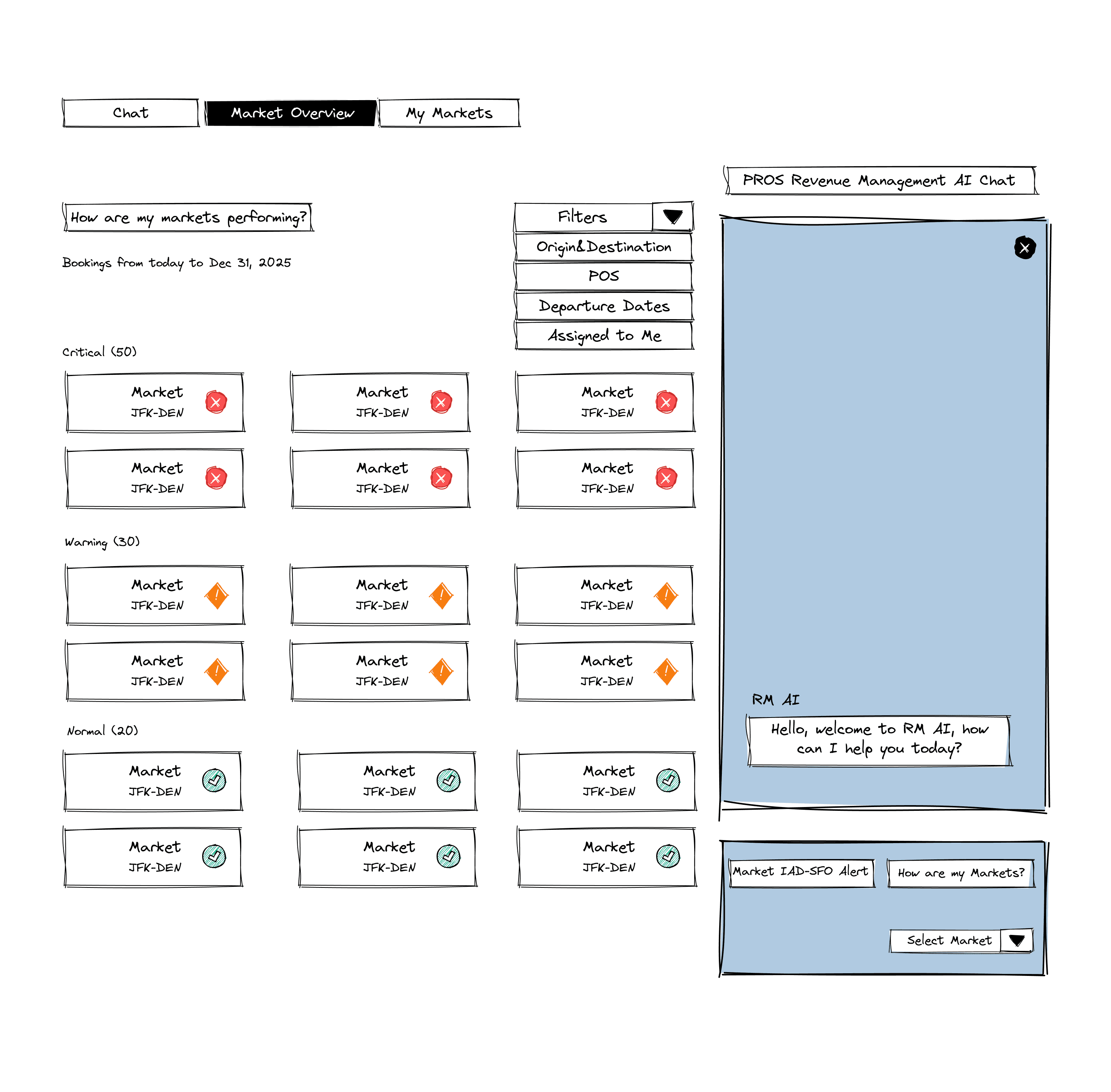
Verdict: Chosen (further exploration)
Embedded AI
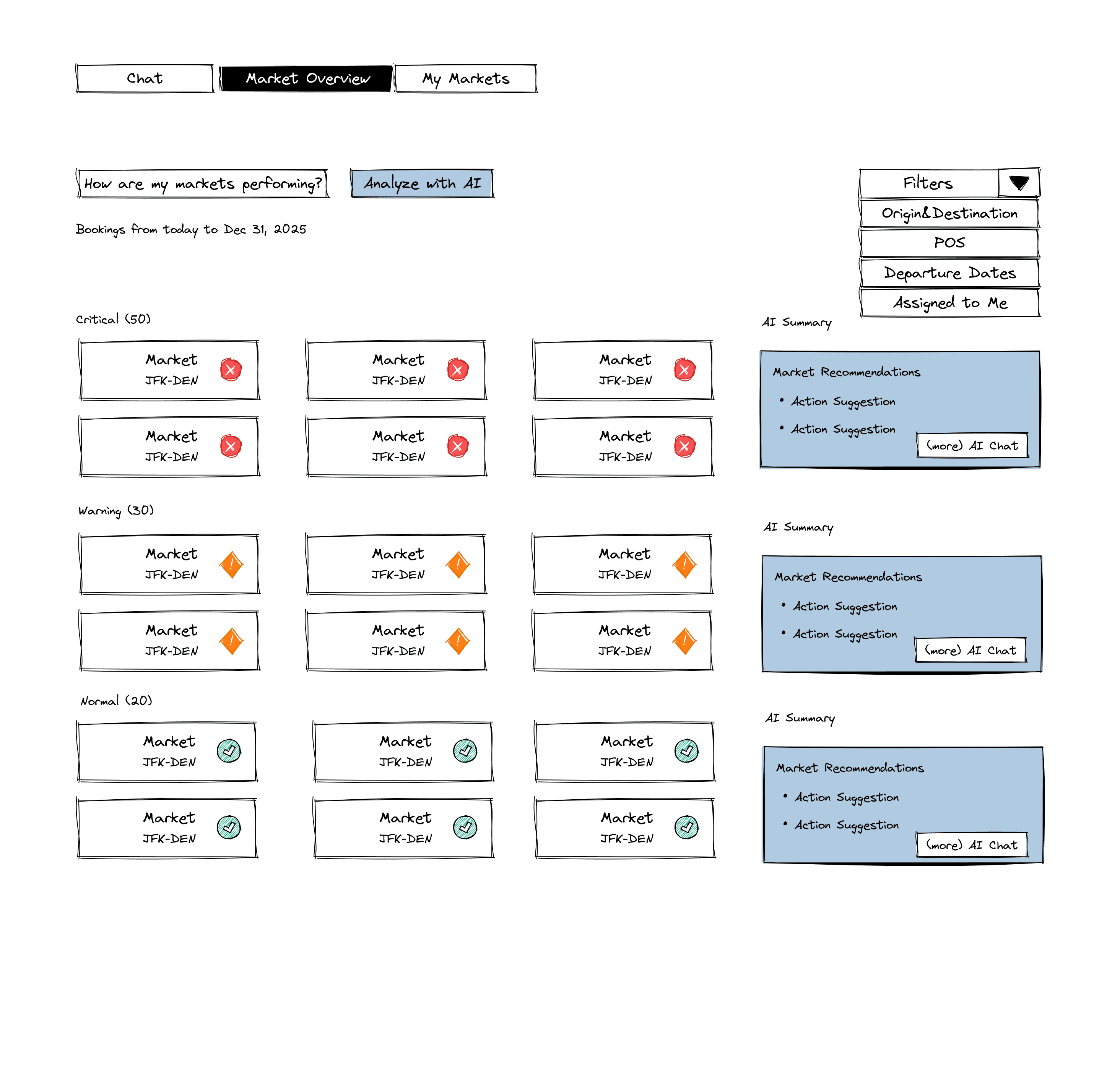
Verdict: Chosen (subtle, lightweight)
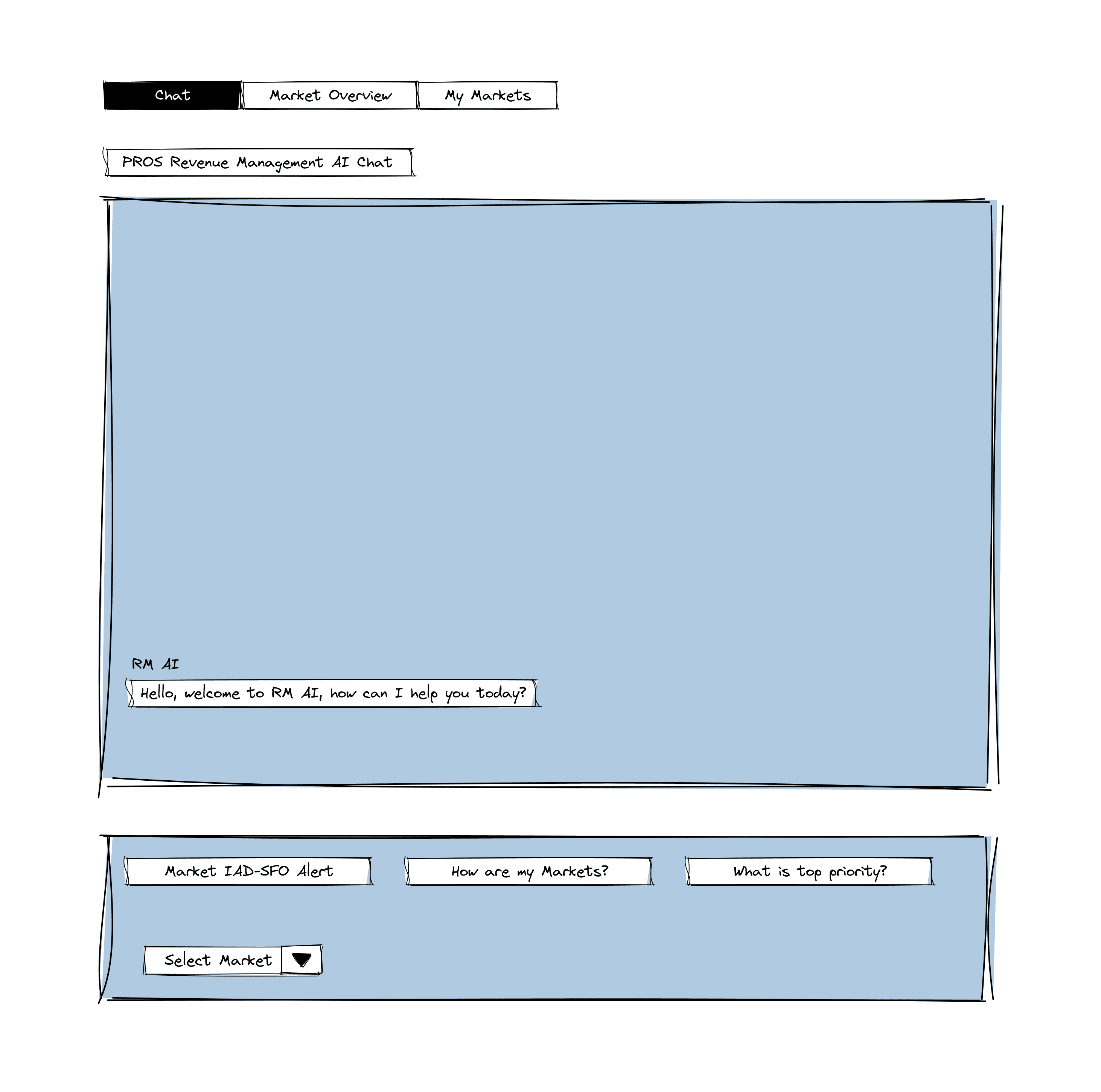
Verdict: Chosen (separate from main workflow)
Note: These are not production final designs. This is what we accomplished by the end of my internship.
WIREFRAME TESTS
My Markets: Exploring Card Layout
How might we display market cards so analysts can scan quickly without losing important context?
We explored three levels of card density.
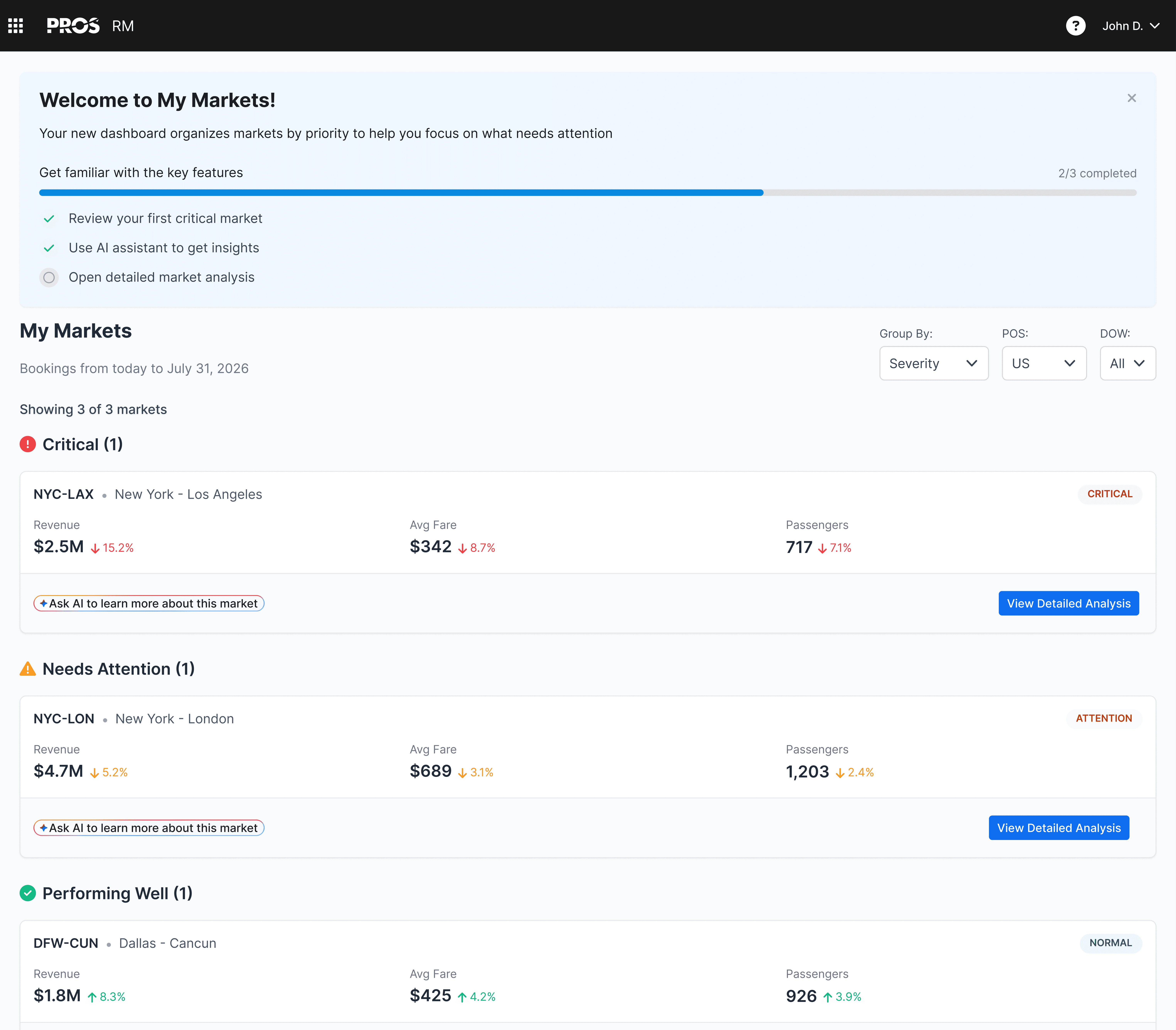
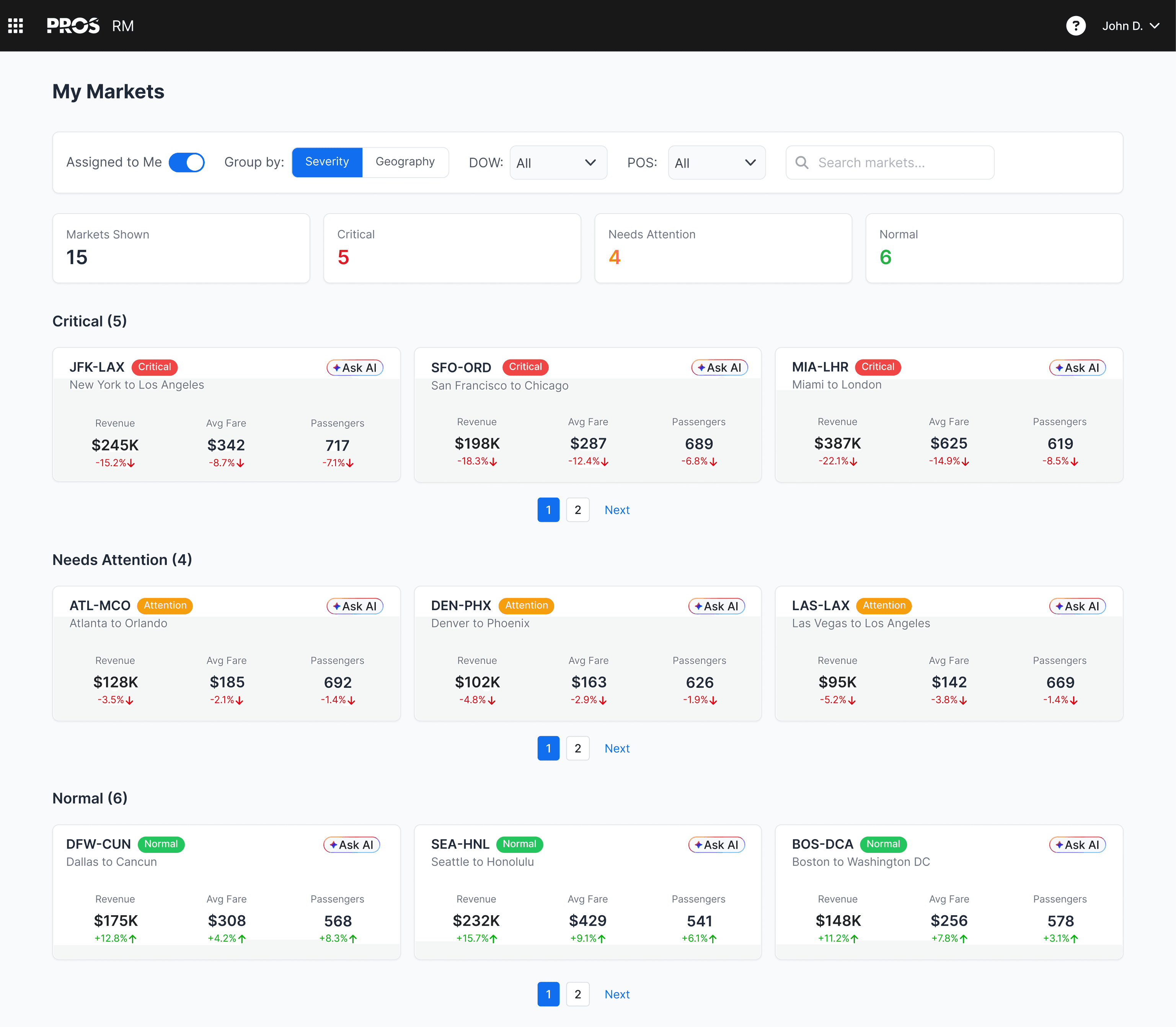
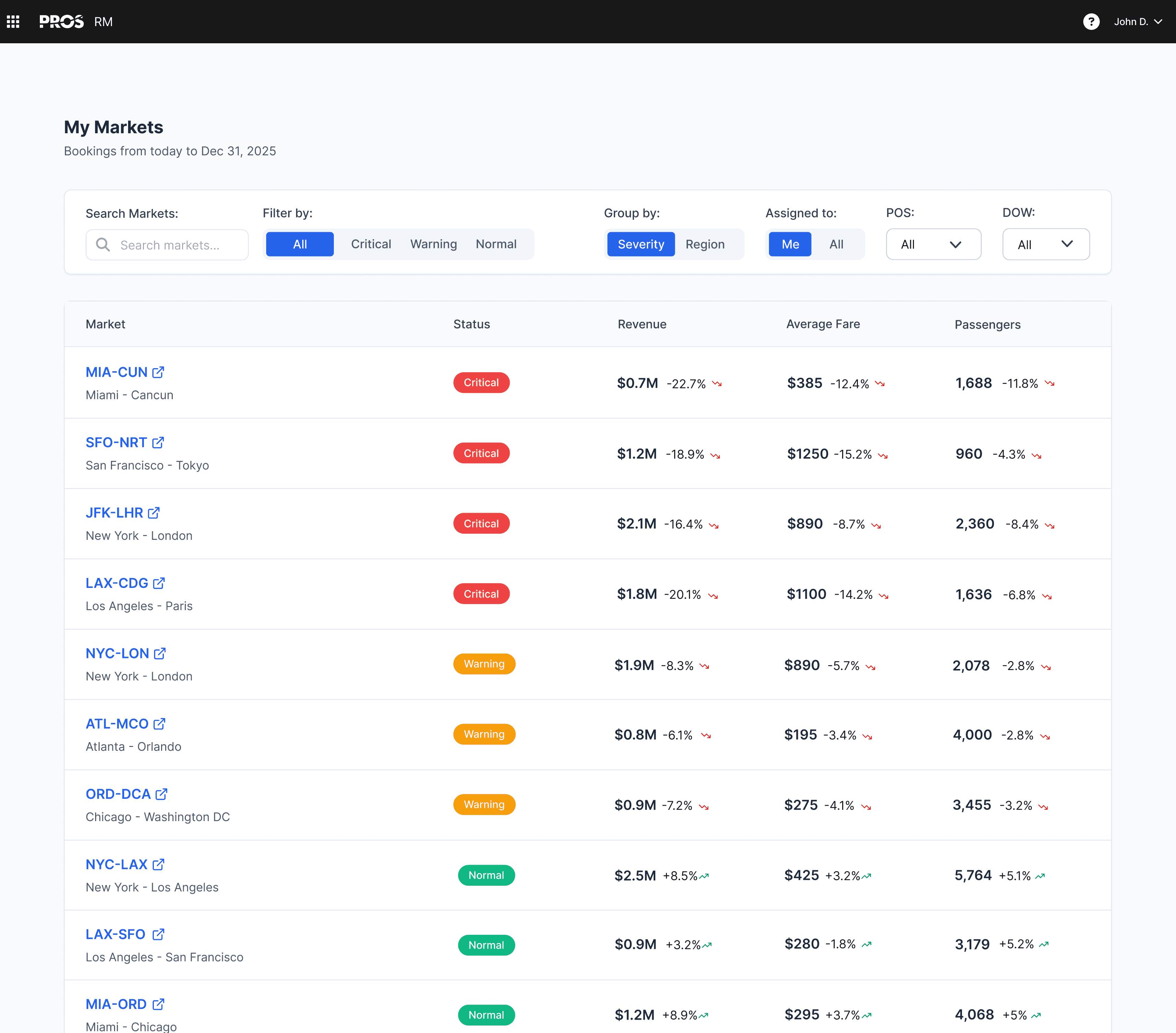
My Markets: Compact Cards
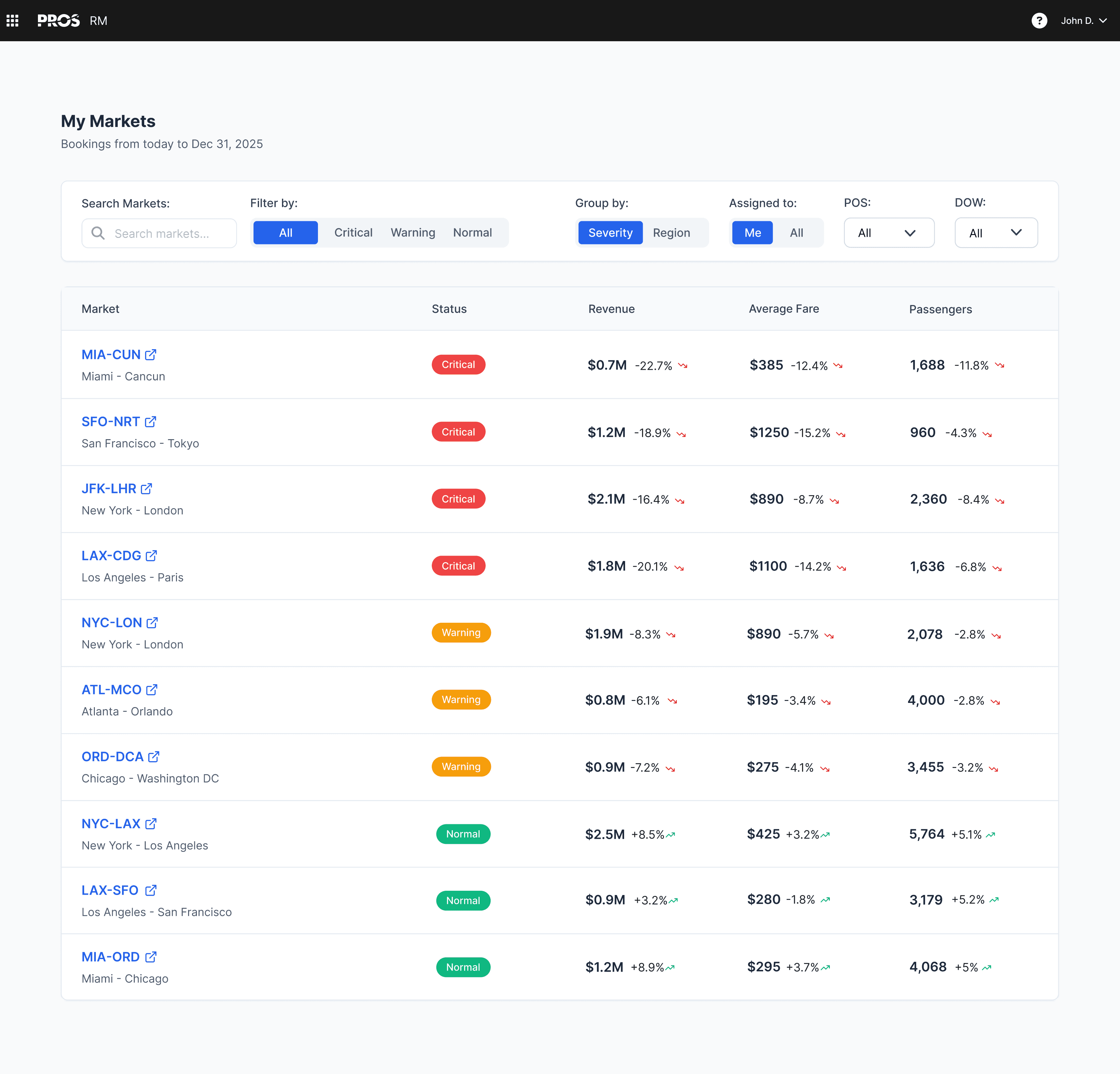
We chose compact rows as the default view as it can scale for dozens of markets and supports both users.
Seniors can scan quickly because density and color coding put information in reach. Juniors can see clear priorities without feeling overwhelmed because critical markets rise to the top.
We got internal validation from our PMs, the UX team, and the VP of Design.
Compact Cards Layout (Claude Generation from Sketch)
5.
Solution
Note: These are not production final designs. This is what we accomplished by the end of my internship.
1.
My Markets
This is the first screen analysts see when they log in. Compact rows are scalable and scannable for large market datasets. Each row shows the market, its status, revenue, average fare, and passenger numbers. Color coding helps you see what needs attention right away. Critical markets rise to the top.
User Impact: So Juniors know where to start, and Seniors can scan through quickly.
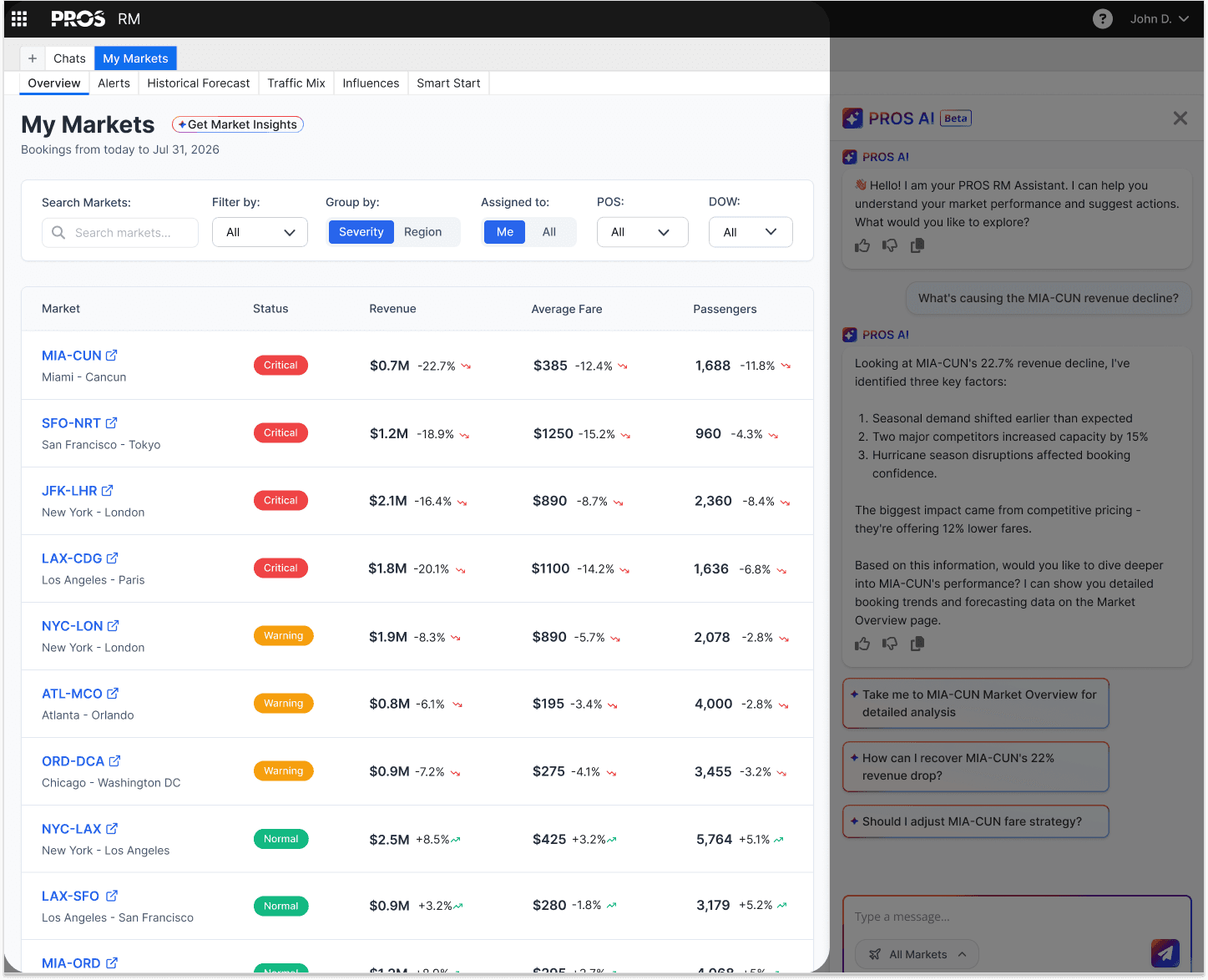
The new My Markets page. Each row shows market, status, revenue, fare, and passengers.
2.
AI Embedded & Chat Panel
Juniors were already leaving the platform to use outside AI tools. So we brought that help directly into RM.
We also added a "Get Market Insights" button at the top of My Markets. Click it, and it surfaces AI insights about market performance. We also added a chat panel on the right side with suggested prompts you can ask.
User Impact: If you're a Junior, you can use these to get unstuck. If you're a Senior, you can ignore them or close the panel entirely. The help is there if you need it.
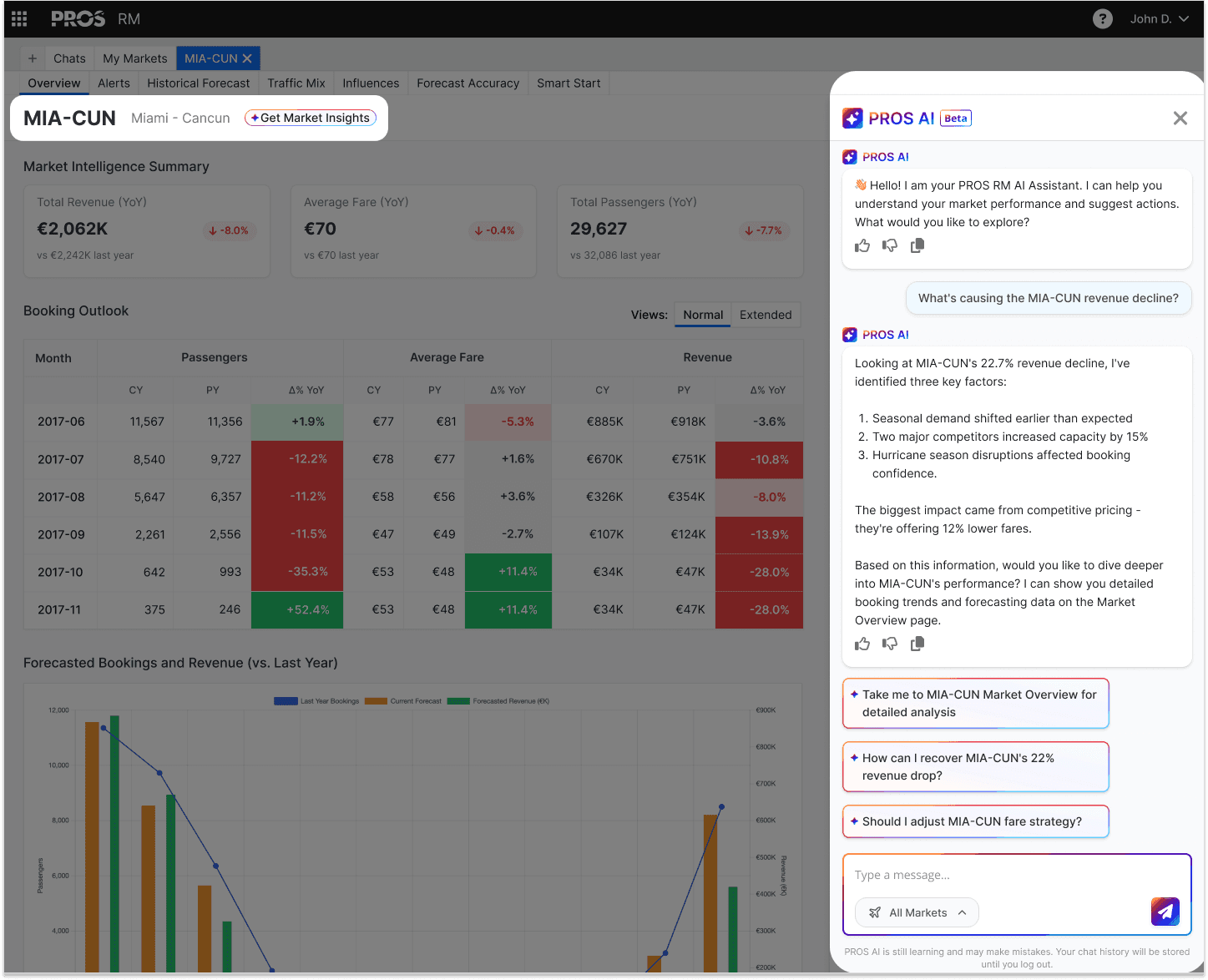
The chat panel slides out from the right. The button sits above the market table. AI help is accessible but not mandatory.
3.
Market Overview
This is where analysts go to dive deep into a specific market. It shows booking outlooks, revenue trends, and competitive context.
User Impact: Senior analysts use this screen all the time. We kept their workflows the same but cleaned up the layout so Juniors could follow the data more easily.
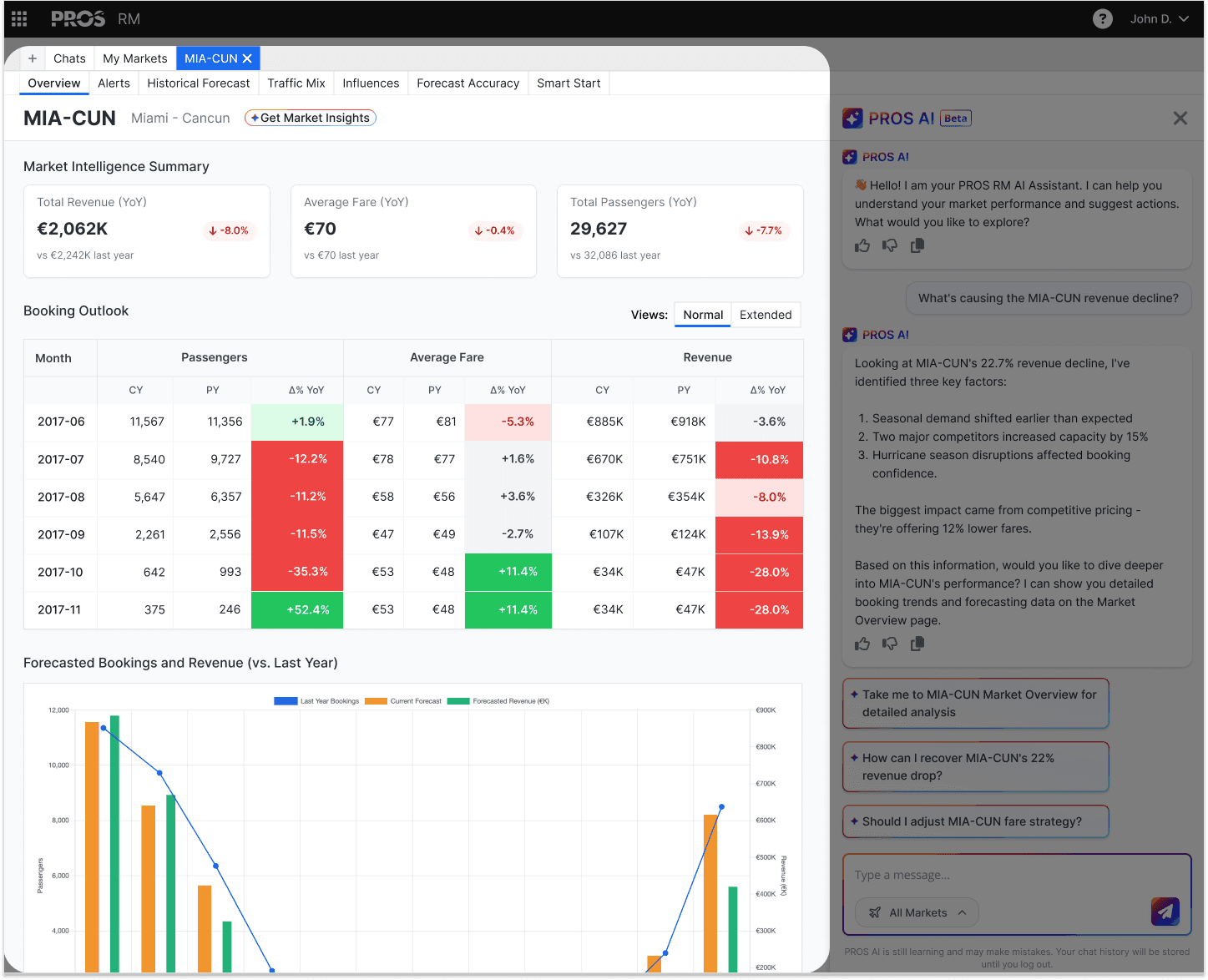
A detailed view of a single market (MIA-CUN) composed of summary, booking outlook, and forecast.
4.
Full Chat Screen
The chat panel works for quick questions. But sometimes you need more space to dig into a problem. That's what the full chat screen is for. Here, the AI can show detailed booking trends, share forecasting data, and walk through analysis step by step.
User Impact: When a Junior needs a deeper analysis, they can open a dedicated chat screen. Seniors also have access to this support if they want it.
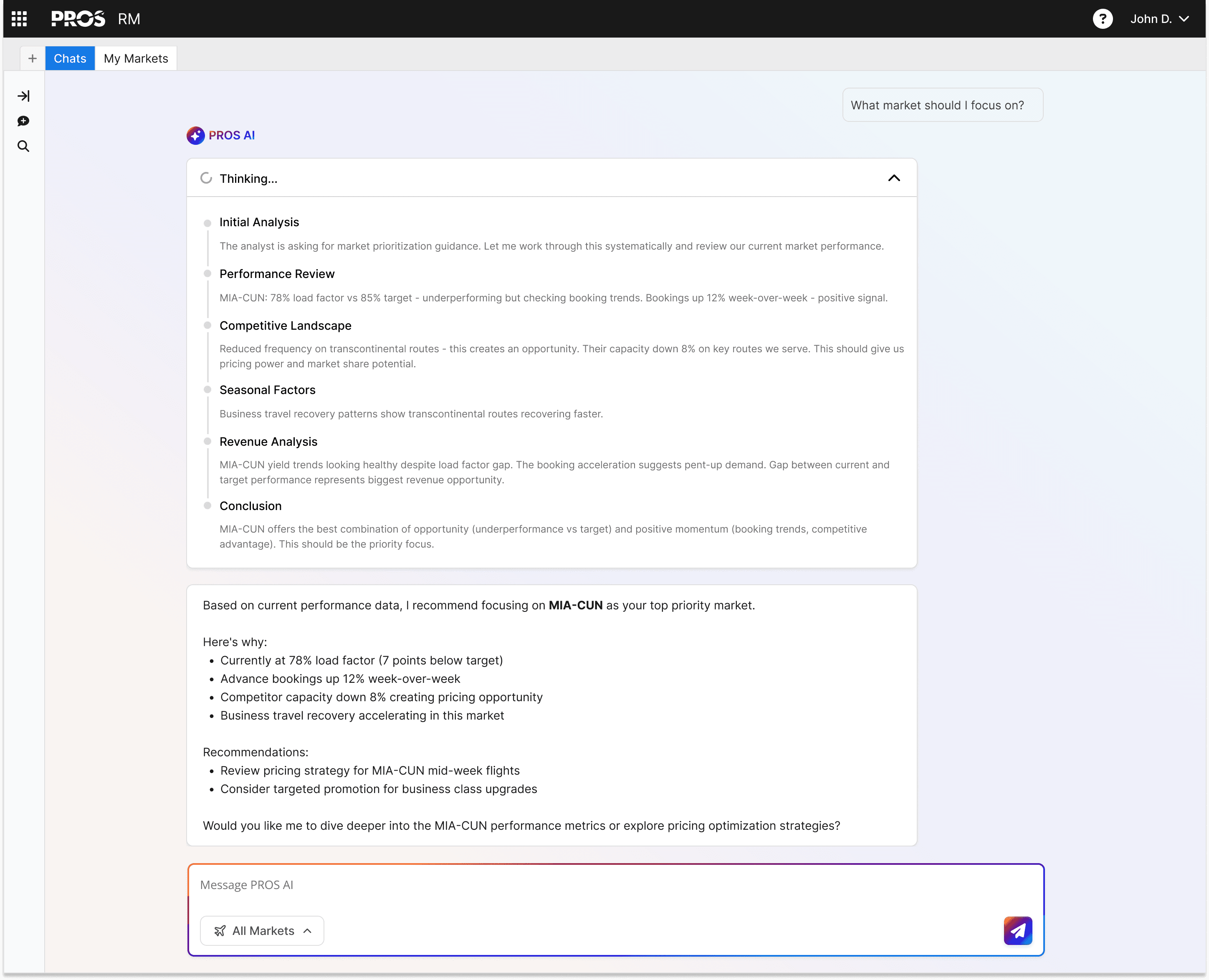
The full chat view is separate from the main workflow.
IMPACT
Stakeholder Feedback
We presented our designs to stakeholders. They liked the direction but wanted AI to be more front and center. Here's what they said, and how we responded.
Stakeholder Feedback
Why don't we move the AI chat panel to the left side? That way, the chat drives what is seen on the right.
My Response:
That would make AI feel like the leader. Seniors would lose the ability to ignore it.
Stakeholder Feedback
What if the first thing they see is a chat prompt?
My Response:
Juniors might benefit. But Seniors would feel forced into a workflow they don't want.
Questions I would have asked in A/B testing
We didn't get to resolve this before the internship ended. Our next step would have been A/B testing our version against a more chat centered layout. Here's a quick mockup of what that could look like, plus the questions I would have asked users.
Questions I would've asked
How do you usually figure out where to start?
Walk me through how you check your markets today.
Did you notice the chat panel? Did you use it?
What I would have measured
Time to first click
Number of chat interactions per session
Task completion rate without chat
How often the chat panel was closed or ignored
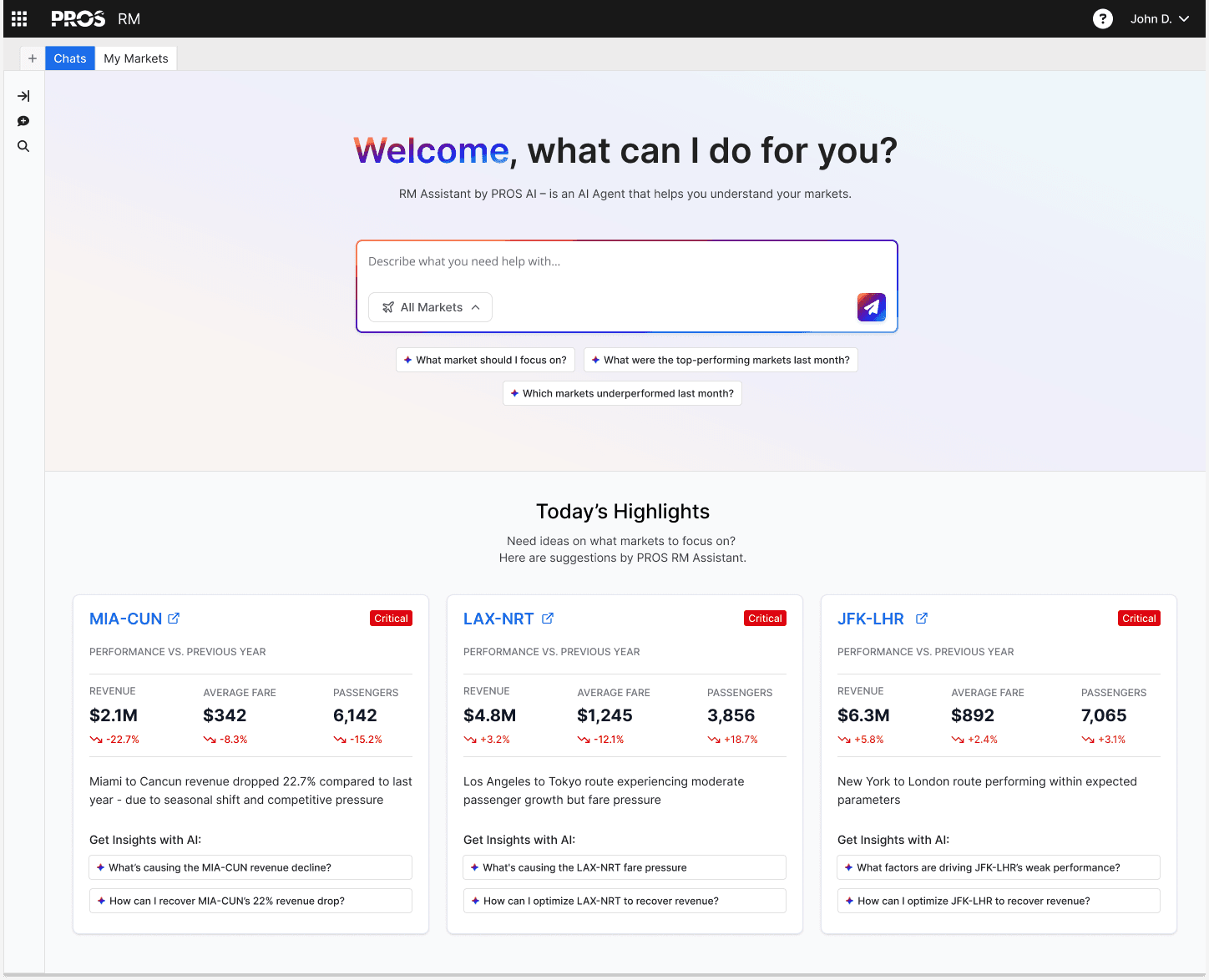
5.
Reflection
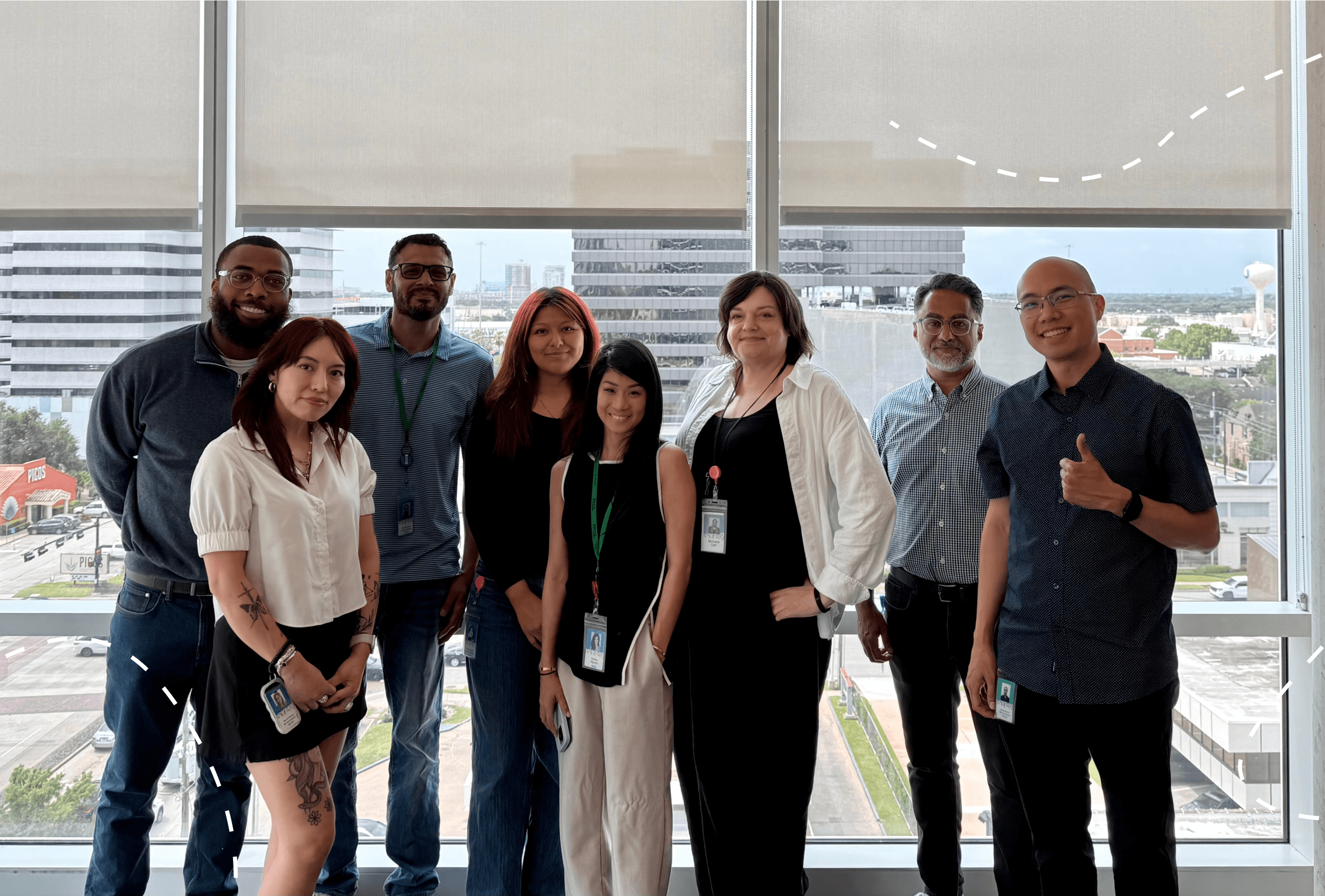
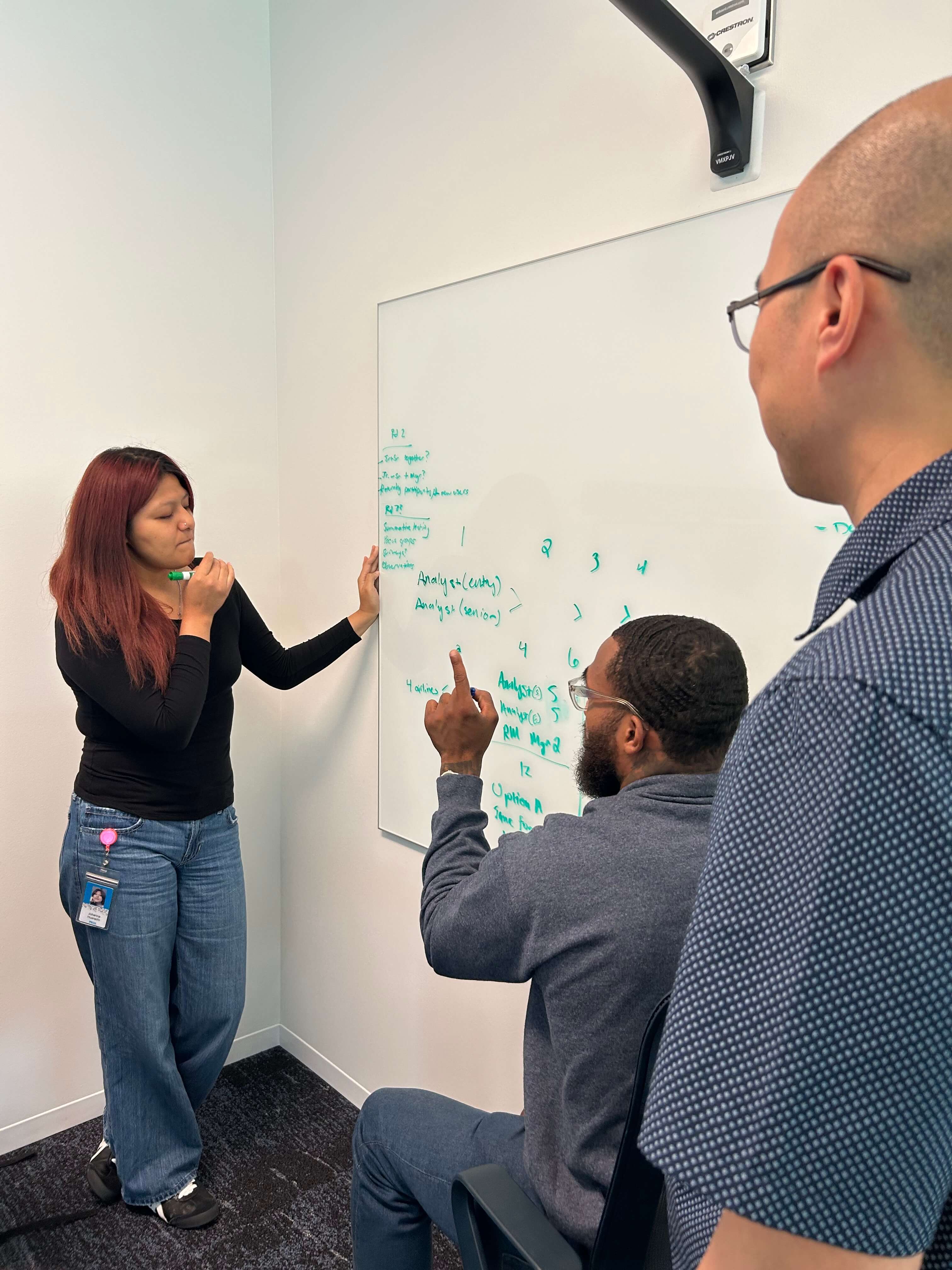
PROS UX Design team
Reflecting on RM
Walking away from this project, I'm grateful for the transformative experience I've had at PROS.
Through UX strategy for the RM platform, I had the unique opportunity to balance the needs of two different users. Juniors needed guidance to figure out where to start, and Seniors needed to move fast without anything getting in their way.
Integrating AI thoughtfully was a transformative experience. Figuring out where AI should live and where it shouldn't was an interesting concept to explore from the user's perspective and to advocate for them by designing meaningfully.
I'm grateful to my team at PROS for trusting me with a modernization initiative for a B2B airline platform and for challenging my thinking. This project isn't finished, but I am proud of what we figured out and excited to see how it turns out.