Expert.ai Corpus
Making enterprise filtering faster, clearer, and accessible

Role
UX Design Intern
Team
1 PM
1 Developer
1 Researcher
2 Designers
Time
8 weeks
Tools
Figma
Figjam
Notion
Overview
Context
You're a healthcare analyst trying to find patterns in patient feedback, or a financial researcher sifting through regulatory documents. Expert.ai helps companies analyze huge amounts of text data to find business insights—the kind of work that could take humans weeks to do manually.
But users kept getting stuck on their filtering system. We had 62 support tickets about it in just 6 months. People were abandoning their analysis tasks mid-workflow, frustrated by something that should be the easy part.
As a UX design intern on the Innovation team, I led the redesign of this filter experience over 8 weeks, working alongside a product manager, senior developer, user researcher, and getting guidance from senior designers.

Result
The redesigned filter experience eliminated workflow abandonment entirely and delivered results that honestly surprised us:
Support tickets about filtering dropped 42% in two months
Users completed filtering tasks in 30-45 seconds instead of 2+ minutes
100% accessibility compliance achieved
Most importantly, analysts at healthcare, finance, and government organizations could finally focus on finding insights instead of fighting the interface.
Scroll to see the process ↓
Problem Statement
How might we make enterprise filtering accessible and scalable for all users?

Current State
The current filtering system requires users to drag and drop filters in a separate window. Expert.ai Corpus allowed enterprise teams to analyze text data and find insights, but this setup created constant back-and-forth between windows just to see if filters were working.
Research
I analyzed 127 support tickets, then conducted 4 in-depth interviews and 6 usability tests with enterprise users across healthcare, finance, and government to understand what was really going wrong.
Here's what they told us:
"…unable to differentiate between filter statuses…"
"the drag-and-drop feature was tedious..."
"… solves information overload but creates interface overload…" – Walt Mayo, CEO

Goals
We started with a broad accessibility challenge, but you can't design with something so general. Synthesizing support tickets and user feedback told us what making filtering accessible actually meant:
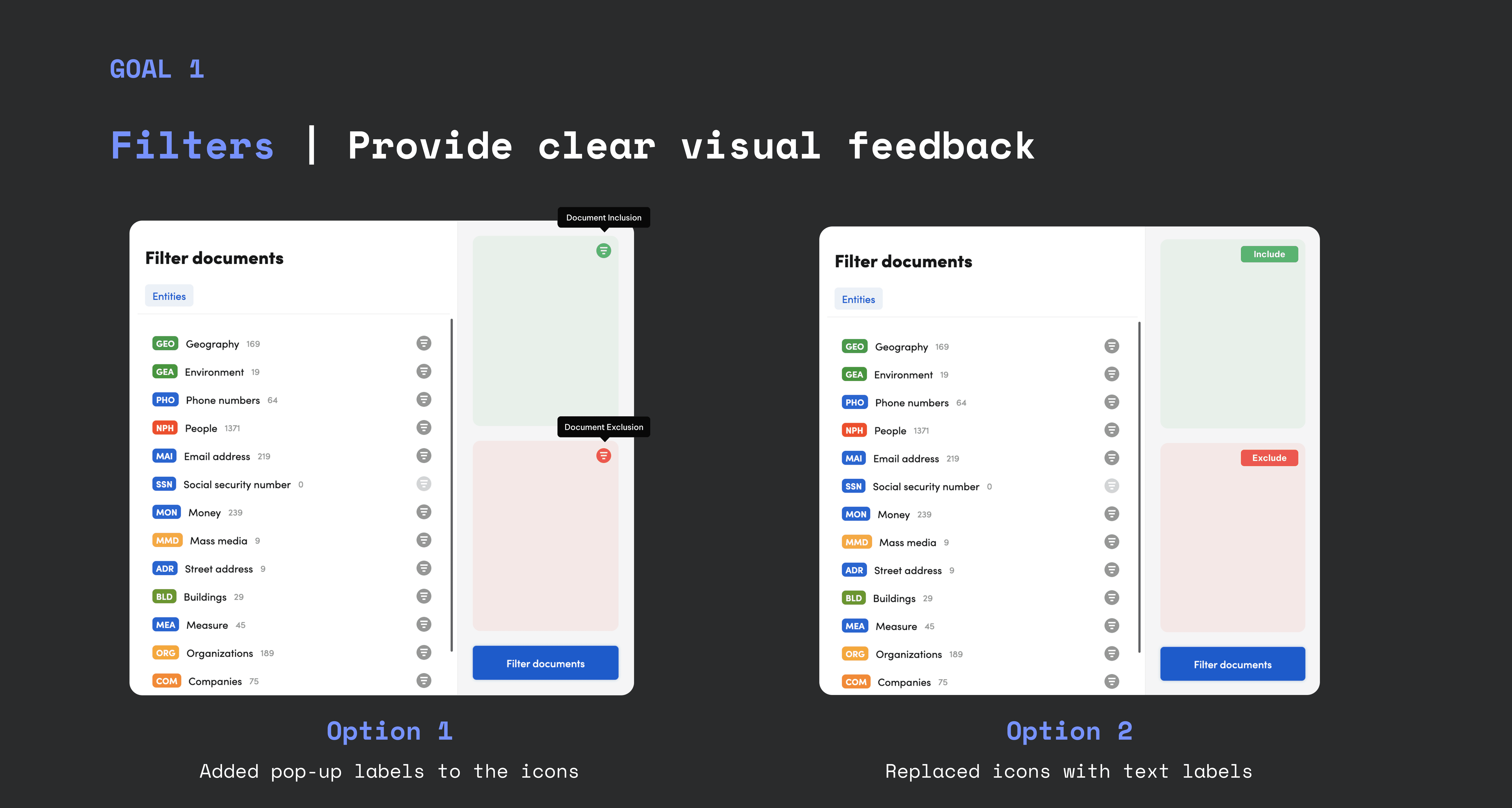
Remove accessibility barriers, provide clear visual feedback, and streamline the interaction flow.
The goal: filtering that works for everyone, not just power users.
Design evolution
(and why we went bold)
We started with conservative tweaks to respect the existing system, but user testing pushed us toward bigger changes. Here's how the design evolved and why we ultimately took a riskier approach.
The cautious attempts
Our first approach was safe—add labels where things were unclear, improve colors that failed accessibility tests. But surface changes couldn't fix the deeper interaction problems.
Neither version made the cut. While both followed our design system, they didn't solve the core interaction problems users faced daily. This pushed us toward a more radical approach to how filtering could work.

The breakthrough solution
To solve core problems like accessibility and efficiency, we explored two advanced design concepts. Both options removed the drag-and-drop feature and incorporated WCAG-compliant colors, each with a different approach to improving the experience.
Selected Design: The Dropdown Solution
By placing the filter next to the results, users no longer had to switch back and forth. Combined with accessible colors and immediate visual feedback, filtering became fast, intuitive, and inclusive.
The Challenge
The dropdown design broke from our design system's existing patterns. This meant a longer timeline and higher engineering costs. To justify this, we knew we had to prove the solution's value through user testing.

Testing
While we had some good design principles guiding us, we needed to test with actual users to prove our hypotheses worked.
We conducted usability and conceptual testing with 4 full-time employees and 4 interns from across the product team, measuring how well the new filtering interface improved efficiency and how our accessible prototypes addressed user needs.

Research Analysis
The results spoke for themselves
Efficiency improved:
Looking at the research, it's clear the new filtering interface was a winner.
We saw a 42% reduction in support tickets and a 75% reduction in average task time (from 2 minutes to 30-45 seconds). The intuitive design and accessible features led to direct and significant improvement in user experience.

User feedback was positive:
When presented with prototypes, users completed tasks faster and provided positive feedback. When asked for their thoughts, they said:
"The new design just feels so much more intuitive."
"The color contrast makes a huge difference. I can finally navigate the platform without any issues."
"It doesn't take me nearly as long to find what I need."
Try it out
Learnings
On the technical side, I discovered how a seemingly small feature, when used consistently throughout a platform, can have huge impact. I initially figured this was a simple fix, but realized filtering was a critical, high-impact feature that required a much deeper approach.
More importantly, I learned the importance of advocating for a user-first approach through validated research. While the new design required breaking from the existing system and demanded more time investment, our user research and testing provided the necessary proof to push for a more accessible solution.
The big takeaway: Strong user data is the most powerful tool for justifying design changes that actually matter.
